HOW IT WORKS

Everything You Need to Know. In One Place.

The MistOne is built to perform out of the box. This page walks you through everything: first charge, filling the reservoir, attaching and swapping mounts, and operating every function. Five minutes here means a lifetime of cooling exactly the way it was designed.

WATCH: Complete MistOne Setup and Operation Guide

See every step in action. From unboxing to mounting to misting, this video covers the full MistOne setup in under five minutes.

IN THE BOX

Start Here.

1

MistOne Fan Unit

2

C-Clamp Mount

(loose in box, not pre-attached)

3

USB-C Charging Cable

4

User Guide

Note: The C-Clamp mount ships loose in the box. It is not pre-attached to the fan. Attaching your first mount is covered in Step 3 below.

Every MistOne ships with four items. Before you set anything up, confirm you have all four.

1

STEP 01

Charge Your MistOne First.

The MistOne ships with a partial charge. Before your first use, charge it to full using the included USB-C cable. Fan should be charged with a 5v/2a charger to maintain battery health.

How to charge:

  1. Locate the USB-C charging port on the base of the fan unit.
  2. Connect the included USB-C cable to the port and plug into any standard USB-A or USB-C power source (wall adapter, power bank, laptop, or vehicle charger).
  3. The LED indicator will show charging status. A solid light means fully charged.
  4. A full charge from zero takes approximately 3 to 4 hours.

KEY FACTS

  • Battery capacity: 2x 5,000mAh (10,000mAh total)
  • Runtime on low: up to 48 hours
  • Runtime on high with continuous mist: 6+ hours
  • The MistOne can run while plugged in. Leave it connected to a power source for unlimited runtime.
2

STEP 02

Fill the Reservoir. Know the Thread Direction.

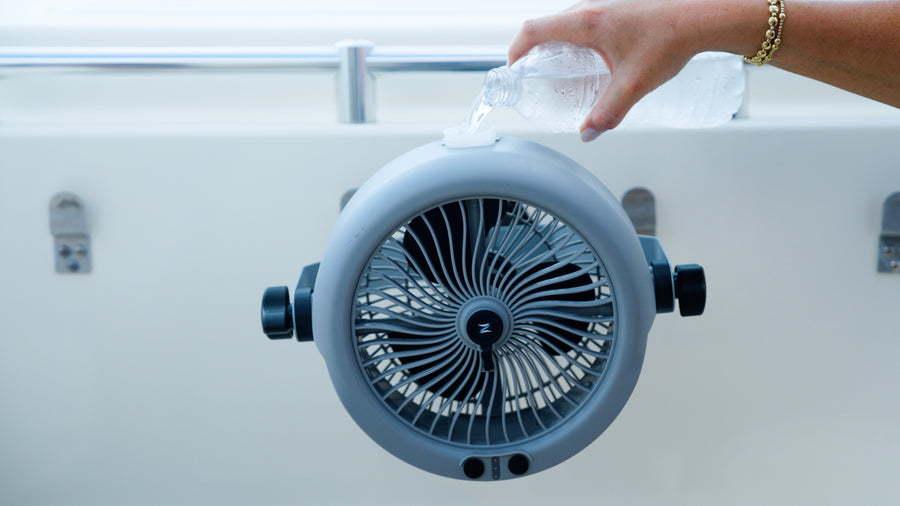
The MistOne holds 450+ mL of water, nearly double the industry standard. The reservoir uses a reverse-threaded cap, meaning it opens by turning clockwise and closes by turning counter-clockwise. This is intentional by design.

How to fill:

  1. Locate the water reservoir at the base of the fan unit.
  2. Turn the reservoir cap clockwise to open (opposite of a standard bottle).
  3. Fill with clean, room-temperature water. Distilled water is recommended for best misting performance and to extend the life of the misting system.
  4. Turn the cap counter-clockwise to close and seal. Hand-tight is sufficient. Do not over-tighten.
  5. With 450+ mL capacity, the reservoir runs for 2+ hours on continuous mist or 4+ hours on intermittent.

Important: If the mist is weak or not flowing, check that the reservoir is fully sealed. A loose cap is the most common cause of misting issues.

3

STEP 03

One Receiver. Every Mount.

This is the feature that makes the MistOne different from every other portable fan on the market. Understanding it takes about thirty seconds.

Every MistOne has a universal mounting receiver built into its base. It is a recessed port specifically engineered to accept any of the seven Zefra mounting brackets.

Every bracket, regardless of type, attaches the same way: align, press, click. That is the entire process. No tools. No adapters. No setup time.

Why it matters: Most customers who think something is wrong with their fan have simply not connected the mount to the receiver. The mount ships loose in the box. It needs to be clicked in before the fan can be mounted anywhere. Once you hear and feel that click, it is locked in and ready.

Step 01

Mount Loose

Step 02

Align to Receiver

Step 03

Clicked in and locked.

The Three-Second Rule

Any Zefra mount attaches to the MistOne in under three seconds. If it is taking longer than that, walk through Step 4 below.

4

STEP 04

Attach in Three Seconds. Swap in Three Seconds.

Every Zefra mount connects to the MistOne the exact same way, no matter which bracket you are using.

To attach a mount:

  1. Hold the MistOne fan unit with the base facing you. The universal receiver is the recessed opening at the base of the fan body.
  2. Hold your mount bracket with the connection tab facing the receiver opening.
  3. Align the tab with the receiver and press firmly until you feel and hear a click.
  4. Give the mount a light tug to confirm it is locked. It should hold firm with no movement.
  5. Your MistOne is now ready to mount to any surface that bracket is designed for.

To swap to a different mount:

  1. Locate the release button on the side of the universal receiver where the current mount is attached.
  2. Press and hold the release button.
  3. While holding the button, pull the mount bracket away from the receiver. It will slide out cleanly.
  4. Set the removed mount aside and click your next mount into the receiver following the same steps above.
Total swap time: under three seconds.
5

STEP 05

Now Mount It. Here Is How Each One Works.

With your mount attached to the fan, here is exactly how to use each bracket.

$29.00

C-Clamp

(Included with every MistOne)

Open the clamp by rotating the tightening knob counter-clockwise until the jaw is wide enough to fit around your surface. Place the clamp around a rail, bar, or edge up to 2 inches thick. Rotate the knob clockwise to tighten until the clamp holds firm. Do not over-tighten on soft or coated surfaces.

Best for

Golf carts, stroller frames, railings, workbenches, cart bars, UTV roll cages.

$39.00

Cup Holder Mount

Place the base of the cup holder mount directly into any standard cup holder. Expand the base by rotating or pressing the adjustment ring outward until it fits snugly against the walls of the cup holder. No additional securing needed. The fan weight and friction hold it in place.

Best for

Golf cart cup holders, camp chair holders, vehicle cup holders, stadium seating.

$39.00

Octopus Mount

Identify the surface you want to wrap around. Open or loosen the flexible legs of the octopus mount and wrap them firmly around the pole, handle, frame, or surface. Tighten each leg until the mount holds without sliding. The octopus is designed for irregular surfaces where a clamp or clip will not reach.

Best for

Tent poles, canopy frames, bike handles, boat rails, equipment frames.

$39.00

Magnet Mount

Place the flat magnetic face of the mount against any clean metal surface. The magnet will grip on contact. Position the fan where you want it and press the mount flat against the surface to maximize hold. For best results, use on clean, flat, non-coated metal.

Best for

Toolboxes, truck beds, metal shelving, garage equipment, machinery.

$39.00

Suction Cup Mount

Press the suction cup firmly against a clean, smooth, non-porous surface. Flip the locking lever down to create a vacuum seal. Confirm the seal holds before mounting the fan. Reset the lever and reposition if the surface is uneven.

Best for

Boat consoles, windows, smooth fiberglass, glass, polished panels.

$39.00

Tripod Mount

Spread the tripod legs into a stable stance on a flat surface. Click the fan receiver onto the tripod head. Adjust the legs until level. Use on tables, benches, or the ground for hands-free cooling.

Best for

Campsites, picnic tables, sidelines, patios, tailgates.

$29.00

Spring Clip Mount

Squeeze the spring clip open and position it over the edge, fabric, or pole you want to attach to. Release to let the spring tension grip. Confirm the clip is fully seated before loading the fan.

Best for

Strollers, umbrellas, tent walls, chair backs, canopy edges.

CONTROLS

Fan Speeds and Misting Controls.

The MistOne has two independent control systems: fan speed and mist. Both operate from the control panel on the fan body.

Fan Speed

The fan has three speed settings. 3-second press to turn on, then a short press to cycle through, followed by another 3-second press to turn off. Press the fan speed button to cycle through them.

Low

800 to 1,200 RPM. Quiet airflow. Maximum battery life (up to 48 hours).

Medium

1,500 to 2,000 RPM. Balanced airflow and battery performance.

High

2,200 to 2,800 RPM. Maximum airflow at 11+ mph. Best cooling output.

Press and hold the power button to turn the fan off completely. A lot of people ask about the CFM rating, which is currently around 250 CFM on high speed.

Mist Controls

The misting system operates independently from the fan. The fan does not need to be running for mist to activate, and the mist does not need to be on to run the fan. 3-second press to turn on, then a short press to cycle through, followed by another 3-second press to turn off.

Press Once

Press the mist button once: continuous mist (200 mL/hr).

Press Twice

Press the mist button twice: intermittent mist (100 mL/hr, pulsed bursts).

Press a Third Time

Press a third time: mist off.

The misting system will not activate if the reservoir is empty or not properly sealed. If mist is not working, check the water level and confirm the reservoir cap is fully closed.

MAINTENANCE

Keep It Running Like New.

The MistOne is built to last for years with minimal upkeep. Follow these simple steps after every use.

After Each Use:

  • Empty any remaining water from the reservoir if storing for more than a day.
  • Flush the reservoir with clean water and allow to air dry before storage.
  • Wipe the exterior of the fan with a dry or slightly damp cloth. Do not submerge.

For Best Misting Performance:

  • Use distilled or filtered water in the reservoir when possible. Tap water with high mineral content can cause buildup in the misting nozzle over time.
  • If mist flow weakens, clean the misting nozzle with a soft brush or run a cycle of distilled water through the system.

Long-Term Storage:

  • Store the MistOne in a dry location away from direct sunlight.
  • Charge to approximately 50 to 70 percent before extended storage to preserve battery health.
  • Detach mounts and store them separately or in the original packaging.

Fan Blades:

The fan does not require lubrication or mechanical maintenance. If debris enters the fan housing, use compressed air to clear it. Do not insert objects into the fan housing.

TROUBLESHOOTING

Something Off? Check Here First.

Most questions about the MistOne come down to one of four things. Check these before reaching out.

Check that the reservoir is filled with water. Check that the reservoir cap is fully closed and sealed. Remember: the cap is reverse-threaded. Close by turning counter-clockwise. If the cap is even slightly loose, the misting system will not pressurize correctly.

Make sure the mount is fully clicked into the receiver. Align the bracket with the receiver channel and press until you hear and feel it lock. Pull gently to confirm it is seated before loading the fan.

Press and hold the power button for a full 3 seconds. If nothing happens, charge the fan via USB-C for at least 30 minutes and try again. Confirm the charging indicator lights up when plugged in.

Confirm the surface is clean, dry, and within the mount's supported size range. For clamps, tighten until firm without over-tightening. For magnet and suction mounts, use only on clean, flat, non-coated surfaces.

Still need help?

Our team is available Monday through Friday, 9:00 AM to 5:00 PM EST.

Email: support@zefrainc.com

READY TO GO

You Are All Set.

The MistOne was built to perform in every environment you take it into. Now that you know exactly how it works, the only thing left is to get out there and use it.

Need another mount for a different setup? Every Zefra bracket is sold separately and ships ready to click in.

Shop All Mounts